A remote guest can forgive a slightly wide camera shot. They won’t forgive missing the vows, readings, or words that matter most.
Strong wedding livestream audio takes more than placing a phone on a tripod near the ceremony. It needs a clear source plan, dependable equipment, realistic testing, and someone assigned to monitor the feed remotely.
When the audio receives the same care as the ceremony timeline, distant family and friends feel included instead of left watching a beautiful but muffled video.
Key Takeaways
- A wedding livestream needs a separate audio mix designed for remote guests, with spoken words prioritized over music and room ambience.
- Place microphones close to the officiant, couple, readers, and musicians, and test each source in its actual ceremony position.
- Test the complete signal path, internet connection, livestream platform, and guest link under realistic conditions before the wedding day.
- Assign someone to monitor the real remote feed and prepare backup cables, batteries, internet, and recording options.
- Protect guest privacy and review music rights, platform settings, and replay access before sharing the livestream link.
Start With What Remote Guests Need to Hear
The room and the remote audience are hearing two different events. Guests at the venue may hear the officiant through speakers, see the couple clearly, and feel the energy of the processional. Remote guests depend on microphones, a stable connection, and the mix sent to their device.
A livestream should prioritize spoken words over processional music, readings, and room ambience. The exact balance depends on the venue, mixer, and streaming platform. Music and natural room sound matter, but neither should cover the ceremony.
Decide Which Moments Need Their Own Audio Plan
Review the full wedding ceremony timeline with the couple, officiant, DJ, venue coordinator, and video team. Mark every moment that needs clear sound, including:
- Processional music and any live musicians.
- The officiant’s welcome, readings, vows, and ring exchange.
- Family readings, prayers, unity ceremonies, and special announcements.
- Recessional music, toasts, and first dances if the stream continues into the wedding reception.
A microphone plan that works for a five-minute welcome may fail during a 25-minute ceremony with several readers. Planning each moment prevents last-minute handoffs and uncomfortable pauses.
Keep the Remote Experience Focused
The stream does not need every sound in the room. A guest at home does not need loud chair movement, kitchen activity, side conversations, or a speaker system pushed to reception volume.
The goal is a clean, balanced feed where voices are easy to understand and music supports the moment. That is what turns a remote viewing link into a meaningful virtual wedding experience.
Why the Stream Needs a Separate Audio Mix
The house mix is designed for people in the room. A livestream mix is designed for people wearing earbuds, listening through a laptop, or watching on a television. Those are not the same job.
A DJ’s main system may need full processional music, ceremony microphones, and enough level for the back row. Sending that exact mix from the venue’s main sound system into a stream often produces music that is too loud, speech that is too low, or audio that changes every time the room level changes.
Build a Mix for the Stream, Not the Speakers
Use a dedicated auxiliary output, matrix output, or small separate mixer when the equipment allows it. This professional audio approach creates a feed that can be adjusted independently of the main speakers.
The stream mix should normally include the officiant, couple, readers, and a controlled amount of music. Add an ambient microphone at a lower level so remote guests can hear applause, laughter, and the natural response after the vows.
A pre-fader auxiliary send can be helpful when changes to the room volume should not affect the livestream. A post-fader send may fit a simple system where music cues need to follow the main mix. The right choice varies by mixer, venue, and operator monitoring the stream.
The clearest ceremony feed usually has less music and less room noise than the sound guests hear at the venue.
Treat Every Source as a Separate Decision
Before the event, label each channel and decide whether it belongs in the livestream mix. Treat the table as a planning guide, not a checklist for every setup.
| Audio Source | Include in Stream? | Planning Note |
|---|---|---|
| Officiant microphone | Yes | This is often the primary spoken-word source. |
| Groom or couple microphone | Usually | It provides a closer backup for personal vows. |
| Reader microphone | Yes | Keep it separate from the officiant channel. |
| DJ music playback | Yes, at a controlled level | Bring it up for entrances and exits, then lower it under speech. |
| Ambient microphone | Yes, lightly | It adds warmth without filling the stream with room noise. |
| House speaker return | No | It can create feedback, echo, and duplicate sound. |
A separate mix gives the operator control when something changes. If a reader steps too close to a microphone or a musician begins playing, the stream can be adjusted without disrupting the ceremony in the room.
Place Ceremony Microphones Where They Can Work
Microphone placement often affects audio quality more than microphone cost. Even a good wireless microphone sounds distant and uneven when placed poorly.
Start with the people who will speak. The officiant should have a dependable microphone, and the groom or one member of the couple should have a second close source when personal vows are important.
Use Lavalier Microphones for the Spoken Moments
A lavalier mic clips near the chest, usually six to eight inches below the speaker’s mouth. Keep it away from necklaces, loose fabric, jackets that rub, and long hair that can brush the capsule.
Placing a lavalier microphone on the officiant captures the ceremony structure well. A second lavalier microphone on the groom can pick up both partners during vows, especially when they face one another.
Ask the officiant before placing any microphone, then coordinate with the camera or wedding videography team about microphone visibility, framing, and backup audio. Some officiants use their own headset or handheld microphone, while others prefer no visible equipment. A respectful conversation during the walkthrough avoids surprises on the wedding day.
Give Readers and Musicians Their Own Plan
A lectern microphone works well for readings when the stand is positioned and tested for the actual reader’s height. Do not assume a handheld microphone passed between several family members will sound consistent.
Live musicians need separate attention. A nearby microphone can capture a string player or vocalist, but placement must be tested with the musician’s real instrument and volume. A camera-mounted shotgun microphone is an external microphone that can add useful room sound or capture a nearby musician. It should not be the only source for vows from several feet away.
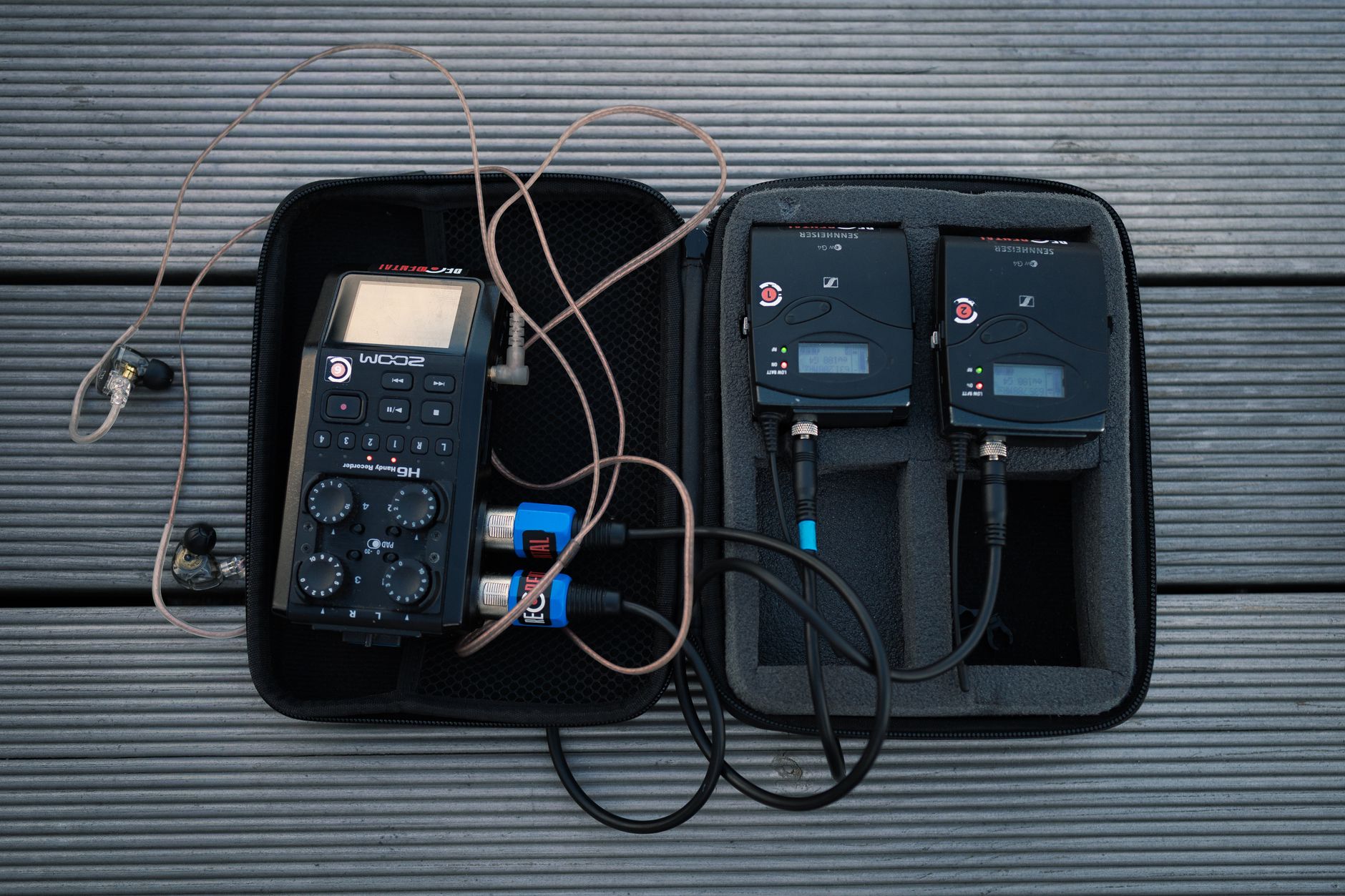
Photo by Vladislav Anchuk
Choose Equipment That Fits the Ceremony
A smartphone’s internal microphone can work for a quiet indoor wedding ceremony when the phone is close to the speakers and the couple. It is not the best choice for a windy outdoor ceremony, a large ballroom, or vows that need to be clear. A camera-mounted shotgun microphone may help with directional room sound, but it cannot replace close speech capture.
The practical question is simple: can the phone hear the speakers better than the guests in the last row? If not, use an external microphone.
A Basic Smartphone Setup Has Limits
For a small ceremony, place the phone on a stable tripod near the front, but outside the photographer’s and guests’ sightlines. Move it close enough to capture speech without placing it directly beside a loud speaker.
Use airplane mode with Wi-Fi enabled, disable incoming calls and notifications, and fully charge the phone. A battery pack is useful, but keep its cable secured and out of guest walkways.
For a closer look at simple phone-based options, EventLive’s wedding audio guidance explains where an external microphone becomes helpful.
Wireless Systems Need the Right Connection Path
Wireless microphone systems, including units in the RODE Wireless GO family, can send clear speech to a mobile phone, camera, recorder, or mixer. The receiver connection matters as much as the microphone itself.
Some setups use a 3.5 mm output. Others can connect digitally through USB-C, depending on the receiver generation and streaming device. Older iPhones may need a Lightning-compatible cable or adapter, while many newer phones use USB-C. RODE’s Wireless GO II mobile connection guide shows why model-specific cables matter.
Connector types and app menus vary by phone model and app. Test the exact receiver, adapter, device, and livestream app together before the wedding. Never assume a cable that fits physically is sending usable audio.
Apple AirPods can function as a bluetooth microphone in some phone setups, but they are not a first choice for ceremony audio. Bluetooth delay, battery limits, connection changes, and automatic ear detection can create unnecessary risk. A wired or dedicated mic is more dependable.
Prevent Feedback, Echo, and Duplicate Sound
A common audio problem is caused by routing, not microphone quality alone. A phone that receives audio from the mixer and also captures room sound through its internal microphone can create an echo or hollow sound.
The same issue happens when a stream device’s audio return is accidentally sent back into the house sound system. That creates a loop, and a loop can become feedback fast.
Keep the Stream Return Out of the Main System
Don’t route the livestream playback device into the room speakers unless there’s a clear reason and the setup has been tested. If someone needs to monitor the remote feed, use headphones at the control position.
Also mute or remove unused microphones from the livestream mix. An open handheld near a speaker, a tablet playing the stream, or a camera with active audio can introduce unwanted sound.
Watch for Phasing Between Microphones
When two microphones capture the same voice from different distances, their signals can arrive slightly out of sync. Mixed together, they may sound thin, hollow, or uneven. This is called phasing.
Avoid sending several close microphones for the same speaker at equal volume. Choose the better source, then keep the backup channel lower or muted until needed. The same rule applies to a camera microphone and an audio-board feed.
Pick a Platform With Audio in Mind
Audio settings, privacy controls, music processing, and guest access vary by service. If you plan to live stream your wedding, choose a platform early enough to test it under real conditions.
Zoom can be useful for interactive guests who want to see one another and offer live congratulations. It is more demanding to manage, especially if people join with microphones or speakers active.
Zoom Works Best With Deliberate Audio Settings
Default video-call processing can reduce music quality or treat it like background noise. Zoom’s Original sound for musicians and Live performance audio settings preserve more of the microphone signal by reducing automatic filtering.
Use a laptop running the desktop app for music-sensitive Zoom events. Assign one person to admit guests, mute unexpected noise, and monitor the meeting. Disable audience microphones unless there is a planned time for remote guests to speak.
Facebook Live Can Create Music Problems
The platform may be familiar to guests, but it carries real risk when the ceremony or first dance includes commercial recordings. Meta’s music guidelines for video content state that fuller recorded tracks are more likely to be limited, muted, or blocked.
An event website can publish a private guest link, while a dedicated live streaming service designed for a private virtual wedding may simplify guest access. Lovecast is built for wedding livestreams and promotes guest-friendly viewing with audio processing for vows. Still, platform features can’t replace music permissions or a careful sound check, and processing can undermine otherwise professional audio.
Test the Internet and Monitor the Real Feed
A strong venue Wi-Fi signal on an empty weekday does not guarantee a reliable internet connection during a Saturday wedding. Guests, staff, vendors, and venue systems may all be using the same network.
Ask the venue whether a dedicated wired internet connection is available. If Wi-Fi is the only option, test at the ceremony location, not in a nearby office or lobby. Keep dependable cellular backup available when the location has reliable mobile service.
Listen Like a Remote Guest
Do not monitor only at the mixer. The person at the audio position hears the room directly, which can hide problems in the stream.
Have a separate person listen to the live feed on a mobile phone or laptop with headphones. They should check the actual guest link, not a local recording. Ask a virtual guest or off-site coordinator to listen independently. The standard is whether a remote guest can understand the vows and hear balanced music.
Before the ceremony, use the actual guest link for a private test stream. Confirm that the stream has not dropped or gone silent.
There will be delay between the room and the remote feed. That is normal. The monitor should assess clarity, levels, dropouts, and silence, not synchronization with the room.
Rehearse Under Realistic Conditions
A quick equipment check in a quiet room is not enough. Run a full wedding ceremony rehearsal with people speaking at normal ceremony volume. Play the planned processional music and walk through the camera position. Test any shotgun microphone at its actual distance, rather than assuming it will capture vows clearly across the venue. Connect through the same network that will be used on the wedding day.
Weather also changes the plan. Outdoor wind requires foam windscreens or furry protection suited to the microphone and venue. Heat affects batteries, so battery choices should match the equipment and conditions. Rain plans may move the ceremony, alter cable routes, and place speakers closer to reflective walls.
Run a Full Audio Check Before Guests Arrive
A dependable pre-ceremony check should include:
- Confirm that every transmitter, receiver, phone, camera, and battery pack is charged and powered on.
- Speak through each ceremony microphone while someone listens on the remote guest feed. Check normal speaking volume, microphone handoffs, and likely seating positions.
- Play entrance music at a realistic level and verify that it doesn’t overpower speech.
- Check the separate livestream mix after the house system is set for the room. Listen for echo, music bleed, and changes in speech level.
- Confirm that backup cables, adapters, batteries, and a second recording option are close by.
Larger ceremonies, live musicians, or complicated signal paths may justify professional audio support or a more detailed sound check.
Keep cables along walls or approved routes whenever possible. Use cable ramps for unavoidable guest crossings, and never block doorways, emergency exits, or accessible paths.
A well-run rehearsal gives the DJ, officiant, planner, and video operator a shared understanding of cues, microphone handoffs, and backup decisions.
Protect Guest Privacy and Manage Music Rights
A wedding livestream often includes children, private family moments, personal readings, and guests who may not want to appear online. The couple should decide whether the event is public, unlisted, password-protected, or available only through a private link.
Send the viewing link only to invited guests through an event website or another invitation-only channel. Ask one person to manage live chat, guest questions, and access issues so the couple isn’t handling technology during the ceremony. Privacy settings, replay controls, and music enforcement vary by streaming platform, so review them before sharing the link.
Get Clear Consent Before Going Live
Tell the wedding party, officiant, readers, and close family that the ceremony will be livestreamed. Confirm whether any portion should stay off camera, such as a prayer, memorial mention, or private family tradition.
If the stream will remain available after the wedding, set an end date for access. A short replay window can be more comfortable than leaving a personal event online indefinitely.
Treat Ceremony Music and Broadcast Rights Separately
A DJ may have permission to play music at the reception. Retaining or publishing recording footage containing it may require separate permission, especially for processional music, first dances, and background music.
A private link doesn’t automatically satisfy licensing obligations, so choose licensed music, use music created by performers who have approved the broadcast, or mute and replace recorded music in the replay where appropriate. The Lovecast equipment guide is also a helpful starting point for couples comparing livestream tools and simple setups.
Know When a Professional Team Is the Better Choice
A DIY livestream can work for a short, quiet ceremony with a small remote audience. A professional setup is often the better choice for a wedding ceremony followed by a wedding reception broadcast, or when the event includes multiple microphones, live musicians, a large guest list, or outdoor conditions.
Ask what is included before comparing quotes. A complete service may include camera operators, a separate livestream mix, dependable professional audio support, a backup internet connection, guest access support, recording, and a private replay link. Those details affect the price far more than the streaming platform alone.
Questions to Ask a Livestream Provider
A clear conversation should cover the actual audio plan, not only camera quality. Ask whether the provider supplies a wireless microphone or a camera-mounted shotgun microphone. The right equipment depends on venue size, speaker placement, weather, and the video setup. Also ask whether they create a separate mix for remote guests, how they monitor the live feed, and what happens if the venue internet fails.
Ask who supplies adapters, spare batteries, and music rights guidance. Find out how the audio operator coordinates with the wedding videography team and interfaces with, or stays isolated from, the venue’s sound system. An experienced DJ and AV team should coordinate with the venue and planner early, then arrive with a plan that supports the ceremony’s flow instead of competing with it.
Frequently Asked Questions
What is the best microphone setup for a wedding livestream?
The officiant and couple should have dependable close microphones, while readers and musicians need their own tested sources. A lavalier, headset, lectern, or handheld microphone may work depending on the ceremony and the speaker.
Can a phone microphone capture clear wedding ceremony audio?
A phone’s internal microphone can work for a small, quiet ceremony when it is positioned close to the speakers. For outdoor ceremonies, large venues, or important vows, use an external microphone or a separate mixer feed.
Should the livestream use the venue’s main sound mix?
Not usually. The house mix is designed for guests in the room, so the livestream should use a separate auxiliary, matrix, or mixer output that keeps speech clear and music controlled.
How should livestream audio be tested before the ceremony?
Run the actual microphones, devices, adapters, streaming app, internet connection, and guest link together. Have someone listen remotely with headphones while the ceremony team rehearses normal speech, music cues, handoffs, and likely problem points.
What should couples do about privacy and music rights?
Use an invitation-only, unlisted, password-protected, or private link according to the couple’s preferences, and tell participants that the event will be livestreamed. Permission to play music at the venue does not automatically cover broadcasting or replaying it online, so review licensing and platform rules in advance.
A Clear Voice Connects Every Guest
The finest camera view can’t replace a parent hearing a vow, a friend catching a laugh, or a grandparent following the ceremony from home. wedding livestream audio should make those moments feel close, even when guests are miles away.
Use a separate mix for the stream, place microphones carefully, test the complete signal path, and monitor the remote feed. With thoughtful preparation, the wedding’s most meaningful words can reach everyone invited to share them.