A school dance can lose its energy before the first song if the DJ arrives to a locked door or distant outlet. A concise technical rider from a provider of mobile DJ services should cover access, floor protection, sound placement, and school contacts. The event planner and professional DJ should share the DJ load-in checklist with school staff and volunteers before DJ gear leaves the vehicle.
Gyms and cafeterias are flexible event spaces, but they are not built the same way. The same rider format distinguishes school-dance requirements from non-dance examples, including ceremony audio, a corporate event, or a wedding DJ booking. Access may be stage-side or through a busy hallway; staff should confirm liability insurance before equipment arrives.
Key Takeaways
- Start the DJ load-in checklist several days before the dance, confirming access, contacts, timing, school rules, and liability insurance requirements.
- Map the gym or cafeteria in advance, including the DJ position, speaker direction, floor protection, exits, traffic flow, and areas that must remain clear.
- Pack a sound system that fits the room, along with backup music sources, microphones, cables, adapters, batteries, and tools for common failures.
- Confirm circuit assignments and keep every cable away from emergency exits, doorways, accessible routes, and high-traffic areas.
- Arrive at least 90 minutes before student entry when possible, then complete a full sound check, staff communication review, and final safety inspection before doors open.
Start the DJ Load-In Checklist Before Event Day
The strongest school dance setup begins several days before the event. The activity director, venue coordinator, custodian, and DJ should use a technical rider as their shared written plan for the room, schedule, and school rules. It should also include a backup plan for access problems, unavailable rooms, or a locked entrance, preventing the common “I thought someone else knew” problem.
Confirm the venue details with the right staff member
Ask for the person who knows the building, not only the person planning the dance. A head custodian or facilities contact can confirm which entrance is unlocked and where carts can roll.
Review these points before packing:
- Confirm the building address, arrival time, door number, and the staff contact’s mobile number.
- Ask where the DJ may park, unload, and leave a vehicle during the dance.
- Request the exact setup location, including the direction speakers should face, nearby power outlets, and the DJ’s power needs.
- Confirm the event timeline, student arrival time, dance start, last song, and teardown deadline.
- Ask about sound limits, lighting restrictions, fog machine policies, and open-flame restrictions.
- Identify the nearest restroom, staff room, emergency exit, and first-aid location.
A professional DJ should arrive with the schedule already understood. The event does not need a long pre-show meeting, but it does need clear answers.
Put school rules and responsibilities in writing
A simple event agreement should state setup and performance times, payment terms, cancellation details, liability insurance requirements, and who can approve changes on-site. It should also name the school contact with final authority over music, volume, announcements, and student requests.
School music standards need equal attention. A vendor serving a corporate event or providing ceremony audio should keep those requirements separate from school-dance music standards. Clean edits are a starting point, not automatic approval. Some radio edits still contain themes, awkward dropouts, or versions that don’t fit a school’s standards. Provide approved genres, must-play songs, a do-not-play list, and a process for handling guest requests without promising every student a song.
A request list helps the DJ understand the crowd, but it should never replace school rules or the event schedule.
Map the Gym or Cafeteria Before You Roll In
A room diagram doesn’t need to be fancy. A photo, sketch, or walkthrough video can save surprising time. Include a simple floor plan in the technical rider, showing the DJ position, speaker direction, exits, food-service areas, chaperone stations, and student traffic flow.
Gymnasiums need open lanes and protected floors
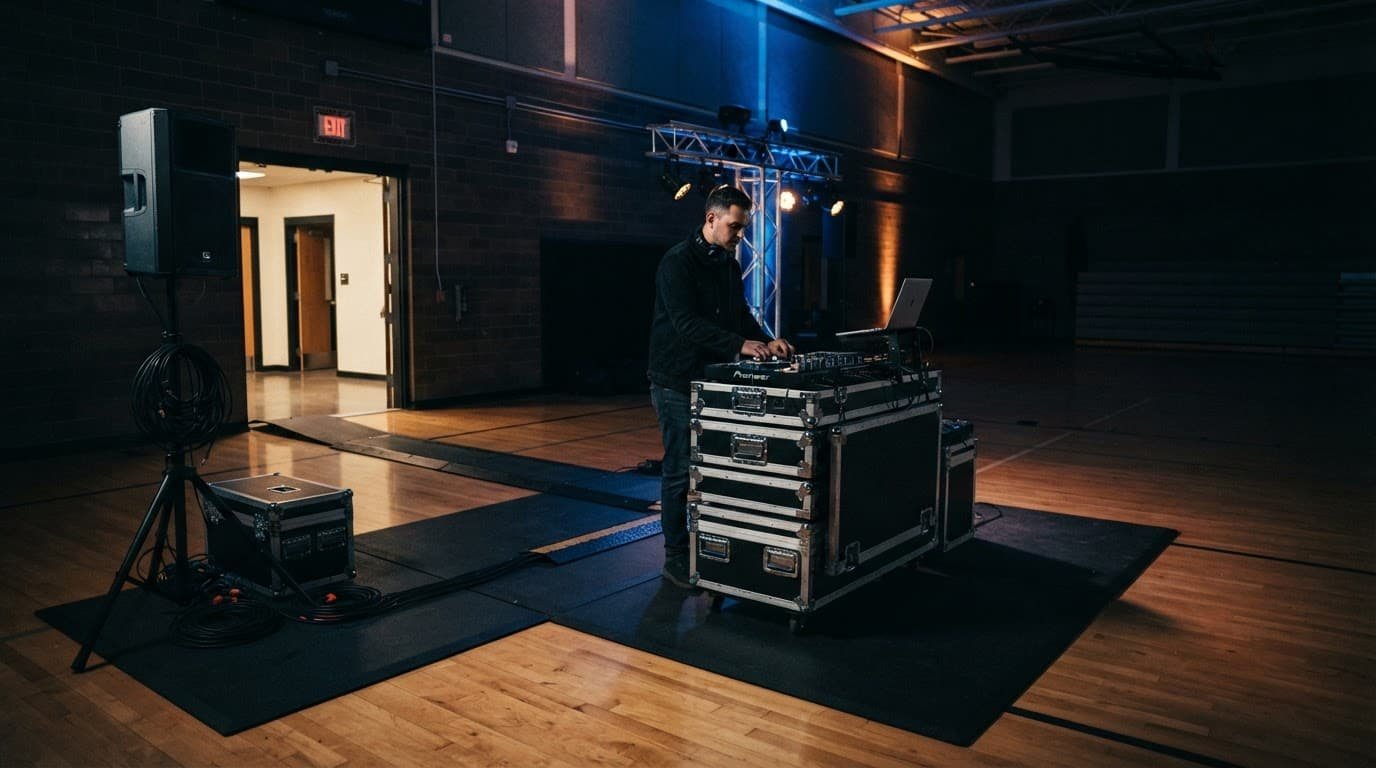
A gym offers room for a larger setup, but the floor deserves careful treatment. Use rubber mats, furniture pads, or approved protective material under speaker stands, subwoofers, cases, and DJ tables. Keep case storage separate from the required DJ gear footprint.
Never drag metal equipment across a finished court. Keep the DJ area away from basketball hoops, movable bleachers, and the main entrance line. Speakers should face the dance floor rather than a hard wall whenever possible. This gives students clearer sound without forcing the setup to run louder than necessary.
Cafeterias require tighter placement
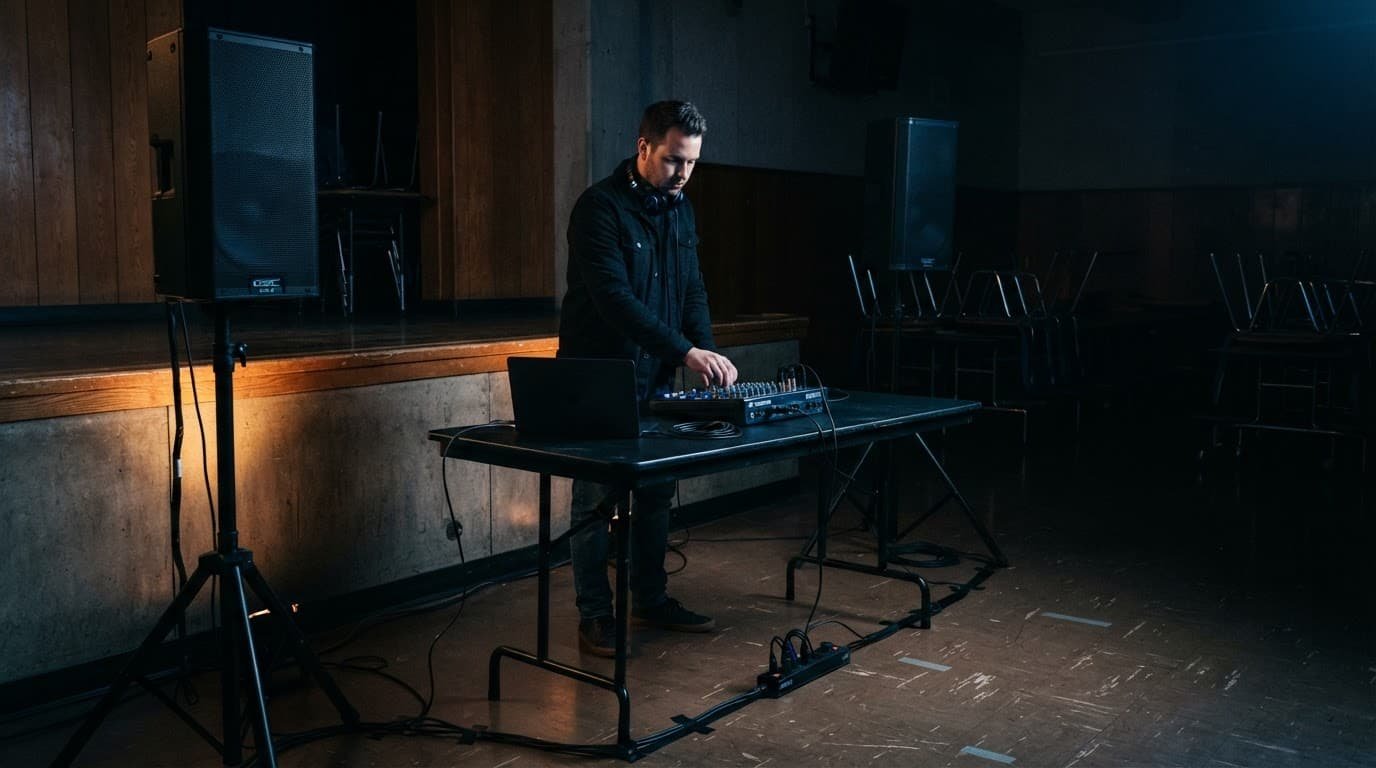
Cafeterias often have lower ceilings, reflective walls, food-service equipment, and less space between tables. Confirm whether tables will be removed before load-in. If they remain, use a compact DJ footprint along a wall or in a corner.
Keep serving lines, kitchen access, door swings, and staff routes clear. Don’t assume a raised stage exists. A clean, low-profile setup with carefully aimed speakers often works better than forcing a large production into a small lunchroom.
Pack Mobile DJ Gear With Built-In Backups
A club DJ can often arrive with a controller and headphones. A professional DJ at a school dance is responsible for music playback, microphones, sound coverage, lighting, announcements, and backups. Every piece of DJ gear should be packed in labeled cases before event day.
Bring the equipment that supports the full room
Match the sound system to the venue’s size and layout. Two powered speakers may cover a small cafeteria. A larger gym may need additional speakers or a subwoofer, depending on attendance and school policy.
A technical rider helps school staff understand the planned equipment. A vendor who also handles a corporate event or ceremony audio may carry additional equipment. They shouldn’t bring a larger system into a cafeteria unless the room, circuits, floor, and school rules support it.
A dependable school dance gear kit includes:
- A primary controller or live mixer, laptop, power supply, and music library downloaded for offline use.
- Main speakers, stable stands, approved speaker bags, and the correct audio cables.
- A wired microphone and a wireless microphone with fresh batteries.
- Lighting equipment, stands, clamps, safety cables, and a lighting controller if needed.
- Extension cords, power strips rated for the equipment, cable ramps, gaffer tape, and cable ties.
- A small tool kit with adapters, flashlight, multi-tool, spare fuses where applicable, and cleaning cloths.
The equipment list should fit the actual room. More gear isn’t always better. The right system is stable, clear, and appropriate for the school.
Backups prevent a small failure from becoming a public problem
Bring a second music source, duplicate music files, spare cables, and backup adapters. Keep a wired microphone available, even if wireless microphones are the main choice. Wireless systems are convenient, but batteries, frequencies, and accidental drops happen.
Write a backup plan for an unavailable laptop, failed controller, dead microphone battery, or other equipment failure. A second laptop or prepared playback device can serve as a backup DJ system while the primary setup restarts. Test it before the doors open. A backup system that hasn’t been checked is only a box in a case.
Plan Power and Cable Management With Care
Power needs should be confirmed with the venue coordinator before load-in. A technical rider should document circuit assignments, device input ratings, outlet locations, and venue restrictions instead of relying on visible power outlets. A gym may have several outlets on one circuit, while a cafeteria outlet may share power with refrigeration or kitchen equipment.
Calculate the actual electrical draw
Use each device’s input rating when calculating DJ gear loads, not the large peak-output number printed on a powered speaker. At 120 volts, a 600-watt electrical load draws about 5 amps. A 1,200-watt load draws about 10 amps.
Add the input wattage of speakers, subwoofers, laptop, controller, lighting, wireless microphone receivers, and accessories that share a circuit. Then divide by 120 to estimate amperage. A compact setup may be modest, while a system with active subs and multiple lighting fixtures can approach a circuit’s limit.
Ask school staff to approve circuit assignments, request dedicated circuits when possible, and never daisy-chain power strips. Avoid sharing a circuit with concession equipment, custodial machines, or other vendors, and have a backup plan for a shared or overloaded circuit. Portable cords and plug-connected equipment should receive a visual inspection before use, as outlined in OSHA’s equipment-use requirements.
Keep every cable out of harm’s way
Run audio cables around the perimeter of the room whenever possible. Never place them across emergency exits, stairways, door thresholds, or an accessible route, and the DJ must not block emergency routes. The Naval Postgraduate School’s extension cord safety guidance also warns against running an extension cable through doorways, walls, or areas where it can be damaged.
Use cable ramps for unavoidable crossings, and treat them as required in high-traffic paths. Gaffer tape can secure low-profile leads on a clean, dry, low-risk floor area, but it isn’t a substitute for a cable ramp. Remove tape slowly during teardown so it doesn’t damage the surface.
Set Sound Levels That Keep the Dance Comfortable
Loud is not the same as exciting. Students need to feel the music, hear the beat, and still follow announcements or staff instructions. Speech clarity matters at a corporate event and during ceremony audio, too, but school gyms and cafeterias add hard-surface reflections that can make sound harsh.
Test at realistic volume before students arrive
Do a full sound check with the same speakers, microphones, and music source that will be used during the dance. Walk to the back corners, chaperone area, entrance, and nearby classrooms if access allows. Listen for hallway spill from each location.
A professional DJ starts with speakers aimed at the dance floor, not directly at adults standing near the booth. Keep subwoofer levels controlled. Low frequencies travel through walls and can be felt far beyond the room.
Use the school’s technical rider to confirm the approved volume measurement point, decibel requirement, microphone expectations, and staff communication method. A reading near the DJ booth may not match the level at the far wall or hallway. Make the adjustment before the room fills.
Give staff a simple way to communicate
Agree on a clear hand signal or direct contact method for volume changes, announcements, medical concerns, or behavior issues. A live mixer helps the DJ manage microphone gain, music level, and announcements without abrupt volume changes. Keep a wired microphone connected and accessible as a backup plan if the wireless microphone fails.
The DJ manages music and microphones. Administrators and chaperones manage student conduct and discipline.
Keep the DJ booth accessible to the named school contact, but don’t allow a crowd of students behind the equipment. That boundary protects cables, controls, and the event’s flow.
Follow a Practical Arrival and Load-In Timeline
For most school dances, plan to arrive at least 90 minutes before student entry. A gym or cafeteria with tables may need more setup time, so adjust the arrival window. Large proms, pep rallies, and multi-room events may need the same flexibility. Don’t rush setup; leave enough time to test, adjust, and solve surprises without stress.
Use the first 30 minutes for access and placement
On arrival, check in with the school contact and review the technical rider. Before unloading every case, confirm the DJ location, power needs, outlets, doors, exits, and any last-minute changes. Then bring in the largest DJ gear cases first, along with the table and floor protection.
Place equipment before opening cable bags. This keeps the work area organized and prevents rebuilding the setup if a door swings into the chosen location.
Use the remaining time for testing and final checks
Once the system is built, the professional DJ should lead the technical tests. The event planner can handle final approval with the school contact after this walk-through:
- Test every microphone, speaker, music source, and lighting fixture.
- Keep cables secured, emergency exits clear, and accessible routes, doorways, and staff paths open throughout setup and teardown.
- Check that speaker stands are stable and weighted if the venue permits it.
- Review the opening announcement, school rules, and first several songs with the event contact.
- Move unused cases away from the dance floor and keep clear paths for staff.
- Complete a final document check with the school contact, including liability insurance documentation.
- During teardown, remove gaffer tape slowly from approved clean flooring.
If the vendor also handles a corporate event or ceremony audio that day, list those commitments separately from student entry and dance teardown.
Weather and parking deserve a backup plan when entrances are blocked or delays occur, especially in New Hampshire. Rain, snow, ice, or a packed school lot can slow a load-in. Bring waterproof case covers, wear safe footwear, and identify a secondary entrance route before event night. Keep wet equipment away from finished gym floors until it is dry.
Frequently Asked Questions
How early should a DJ arrive for a school dance?
Plan to arrive at least 90 minutes before students enter the room. Gyms, cafeterias with tables, large proms, and multi-room events may require additional setup time.
What should a school provide before the DJ loads in?
The school should confirm the address, unlocked entrance, parking and unloading instructions, setup location, power outlets, event timeline, sound limits, and primary staff contact. A floor plan or walkthrough video can also help the DJ plan speaker placement and cable routing.
How can a DJ protect a gym floor during load-in?
Use rubber mats, furniture pads, or other venue-approved protective material under speakers, stands, cases, and DJ tables. Never drag metal equipment across a finished court, and remove gaffer tape slowly during teardown.
What backup equipment should a school dance DJ bring?
Bring a second music source, duplicate music files, spare cables and adapters, fresh microphone batteries, and a wired microphone even when wireless microphones are the primary choice. Test the backup system before students arrive so it is ready if the laptop, controller, or microphone fails.
How should cables and sound levels be managed?
Run cables around the room perimeter whenever possible, using cable ramps for unavoidable crossings and keeping exits and accessible routes clear. Test sound from the back corners, chaperone area, entrance, and nearby classrooms, then adjust the system for clear, comfortable coverage rather than simply increasing the volume.
A Reliable Setup Sets the Tone for the Whole Dance
A careful DJ load-in checklist does more than protect speakers and cables. It protects the school floor, keeps emergency routes open, and supports staff. As a technical rider, it gives the school, custodian, volunteers, and DJ a shared record of access, floor protection, power, cable routing, sound checks, and teardown responsibilities.
The best school dances feel organized without feeling stiff. When the DJ, activity director, custodial team, and volunteers share a clear plan, the room is ready for a safe, high-energy, and memorable night.